Students
One class's students on your phone. Search by name or ID, and see who owes fees when your school allows it.
What you need first
- A class teacher or subject teacher assignment
- For fees: your school uses Fees in SchooLane, and the office has turned on Teachers can see fee balances
Steps
1. Open the class
Press Assess at the bottom, then Classes, then press the class card. Its actions open. Press Students.
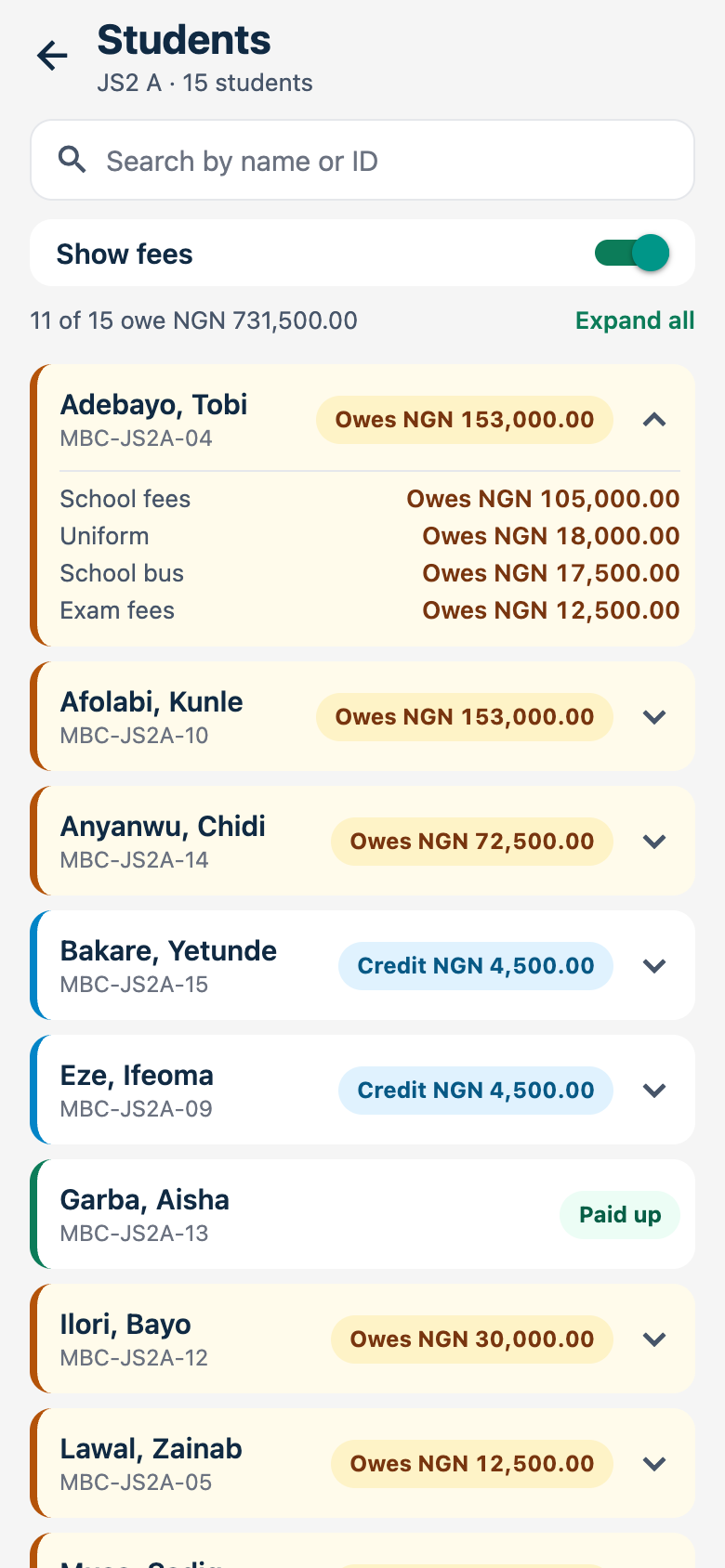
You get the class list, A to Z by surname, with each student ID under the name. Type in Search by name or ID to narrow it.
A child with an allergy has an Allergy badge beside their name, or the allergen itself when there is only one, such as Peanuts. Press the badge to see how severe it is and what to do. A Diet badge means the child has dietary needs.
2. Switch on Show fees
Switch on Show fees. Each row loads its own balance, so the first rows can be ready while others still spin. The line under the switch counts them: Loading fees 6 of 15, then 11 of 15 owe and the total.
- Owes with an amber edge: the student has at least one unpaid fee.
- Paid up with a green edge: nothing is owed.
- Credit with a blue edge: the school holds money for the student.
A credit on one fee never hides a debt on another. A student who owes school fees but has uniform credit shows Owes.
3. See each fee
Press the arrow at the end of a row. Each fee opens under the name, for example School fees, Exam fees and School bus, with what is owed or held as credit. Expand all opens every row and Collapse all closes them.
Switching Show fees off and on again within a few minutes does not reload the balances.
Common mistakes
- Looking for Show fees when your school has not turned it on. Ask the office to switch on Teachers can see fee balances on Fees, Payment setup.
- Telling a parent their balance is wrong. The balances are what the office recorded. If a parent says they paid, ask the office to record the payment.
- Reading Fees could not load for 1 student as paid up. That student's row says Fees unavailable. Go back and open Students again to retry.