My classes
Only the classes you teach. Open one for the roster and the day’s work.
What you need first
- A class teacher or subject teacher assignment
- The current year in the header switcher
Steps
1. Open My Classes
Press My Classes in the sidebar. Some older labels say Classes. Same list.
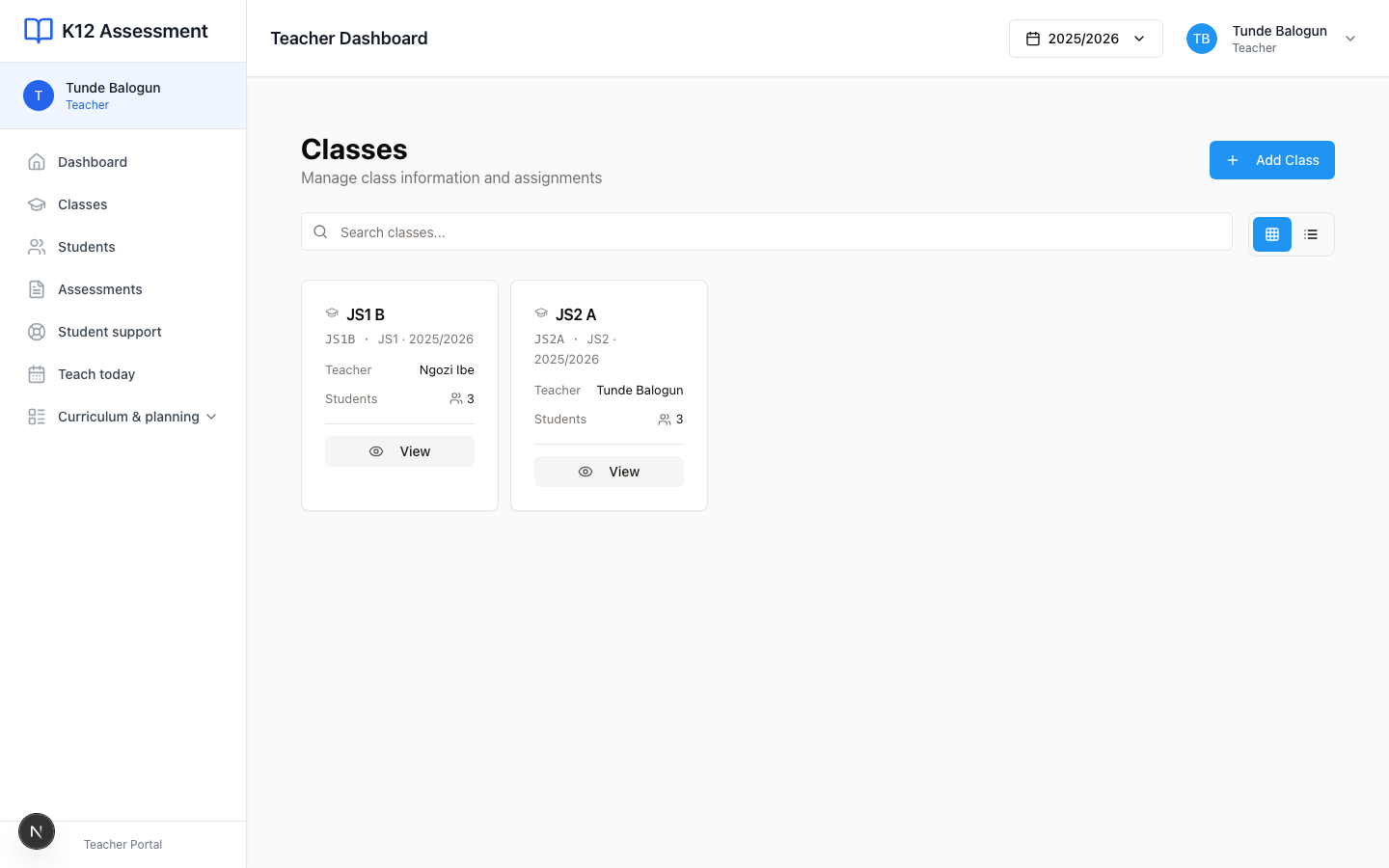
You should see cards. Tunde’s card is JS2 A. Ngozi’s is JS1 B. Each card shows the class teacher and how many students sit there.
2. Open a class
Press the card, then View. You get the student list. Attendance and assessments sit on that same page.
This is where I start when Ibrahim Yusuf was away yesterday and I need the roll before I write a quiz.
3. Open a student
Press a name. Chioma Nwosu’s profile opens in your class, not the whole-school file. You can see her marks and attendance in JS2 A.
You cannot enroll a new child from here. You cannot create JS3 A. Ask the office.
Empty list
No cards means you are not assigned. A school admin sets the class teacher on Classes. Until that happens, Dashboard looks quiet and Teach today has nothing to open.
Common mistakes
- Waiting on Add Class. Teachers do not add school classes. That button is for the office, if you even see it.
- Opening last year’s JS2 A after the year switcher moved. Check the year in the header before you panic.